
These instructions are for renewing a Plumbing & Mechanical Systems Board (PMSB) Contractor License. This is a joint application that includes contractor registration.
Renewing online is the fastest way to get your license and registration.
The contractor license is for the following trades:
- Plumbing
- Mechanical
- HVAC/R
- Hydronics
- Sheet Metal*
*requires a Mechanical master of record.
Don't see your trade listed above? Visit the Contractor Registration page to learn about general contractor registration.
Before You Start Your Renewal:
Make sure you have your required documents saved to your computer. You must upload these documents to complete the renewal.
- Certificate of liability insurance
- Workers' compensation certificate of insurance
- Applies only if you have employees
- $5,000 license and permit bond from a company licensed to do business in Iowa
- $25,000 out of state bond
- Applies only if your company is based outside Iowa
- Master of record (MoR) certification form (678.18 KB) Archived .pdf
- Contractor Registration Fee Exemption Form (64.42 KB) Archived .pdf
- Applies only if you are applying for a contractor registration fee exemption
Your insurance certificate(s) must list the following in the Certificate Holder field:
- Bureau of Environmental Health & Contractor
Iowa Dept. of Inspections, Appeals & Licensing
6200 Park Ave Ste 100
Des Moines, IA 50321
Multiple License Discount
You can be eligible for a 30% discount if you renew two or more active PMSB licenses.
You must complete all license renewals on the same day to qualify for the discount.
For Applicants Who Also Hold an Individual License:
- Start here with your Contractor License renewal to qualify for the discount. If you start your individual license renewal(s) first, you will not qualify for the discount.
- Stop when you are asked to pay the Contractor renewal fees.
- Start your individual license renewal(s).
- Pay the individual license renewal fee(s).
- Return to your Contractor License application and pay the renewal fees.
For help with your individual license, visit the How do I Renew a PMSB Individual License page.
Additional Discount Info:
The discount does not apply to the following:
- Late fees
- Contractor Registration fees (separate from your Contractor License fee)
Our team is unable to fix fee errors if the renewal steps were not followed correctly.
Fees cannot be refunded once they are paid.
Account Setup & Logging In
Access the licensing portal login page.
Need to create an account? Click New User Registration on the online licensing portal home page.
This website displays best on a desktop or laptop. There are known issues with the Safari web browser.
Forgot ID?
Click Forgot ID on the login page to start the recovery process.
Enter the email address you used to create your Enterprise A&A account.
Click Retrieve Id.
Your user ID will be emailed to you.
If you can't recover your user ID, contact the 24/7 help desk at 515.281.5703. Let them know you need help with your Enterprise A&A account login.
Forgot Password?
Click Forgot Password on the login page to start the recovery process.
Enter your user ID. Your user ID ends with '@IowaID'.
Click Retrieve Password.
Answer your security (baseline) questions. Click Continue.
Create and confirm your new password.
Sign in with your A&A ID and new password. After signing in, you will be taken to the DIAL & HHS Public home page, where you will need to sign in again.
If you cannot answer your security (baseline) questions, use the link at the bottom of the page to reset them.
If you can't reset your security questions, contact the 24/7 help desk at 515.281.5703. Let them know you need help with your Enterprise A&A account login.
If you get a temporary password, use it on the Enterprise A&A login page. Do not use temporary passwords on the DIAL & HHS Public Health licensing portal.
Start Your Contractor Renewal
- After you sign in to the online licensing system, you will be taken to the My Profile page.
- Verify that your information under Basic Profile Details is up to date. Update any out-of-date information.
- Select your company profile under Select a Membership for Your Actions. Click Continue. This will save the changes you made to your personal contact information.
- Don't see your company listed? Do not create a duplicate profile. Email the PMSB staff at pmsb@dia.iowa.gov to request linking to your existing company profile. Include the following in your email:
- Contractor license number (00000-CL)
- PIN (number next to your Basic Profile Details).
- Don't see your company listed? Do not create a duplicate profile. Email the PMSB staff at pmsb@dia.iowa.gov to request linking to your existing company profile. Include the following in your email:

- Look at your profile icon. It will show that you are using the licensing system on behalf of your company.
- If you don't see your sidebar menu, use the hamburger menu (three lines) in the top corner.

- Click Company Profile in your sidebar menu.

- Verify your company profile's information before you start the renewal.
- If the email address is wrong, contact PMSB staff at 515.281.6071 or pmsb@dia.iowa.gov to update it. This email is used for renewal reminders and emailing your license document.
- Don't proceed with the renewal if the Tax ID/EIN/SSN is out of date. You need to register a new company record. Then you will apply for a new Contractor license. You will not renew the existing license.

- Click My Programs to view the licenses for your company.
- Click the Renew button that is in line with your contractor license number (00000-CL). Click OK on the pop-up. You will be taken to the Application Form.
- You may need to scroll to the right of this row if you can't see the Renew button.
- If you have already started the renewal, your Renew button will be replaced with an Edit button.
- Use the Edit button to resume an in-progress renewal.

Contractor Renewal Application Form
The Application Form should say Plumbing and Mechanical Systems - Contractor License.

If it does not, you are in the wrong application form. Return to the My Licenses, Permits, & Programs page. Click Renew or Edit on the row with your Contractor License number (00000-CL).
- Answer the 3-6 Yes/No questions under the Affirmation section.
- If you need to answer Yes to any of these questions, provide the requested information. This information is filled out in the field under each Yes/No answer.
- You must upload the documents requested for each question you answer Yes to. If you miss any, your renewal may be delayed. You can upload your documents under the Attachments section.

- Complete the fields and the question under Additional Information.

- Complete the fields and questions under DIAL Contractor Registration Information. This section fulfils the Contractor Registration part of your joint renewal.

- Your unemployment insurance (UI) account number will carry over from your previous application. Update your unemployment insurance (UI) account number if it has changed.
- You must have a UI account number. This is true even if you have no employees. Contact 888.848.7112 if you need to get an Iowa UI Number.
- If you answer Yes to the fee exemption question, you will need to upload your notarized form.
- If you answer Yes to the out-of-state bond question, you will need to upload your out-of-state bond.
- If asked, upload your required document. The attachment Type is already filled in.
- Enter an attachment Description.
- Click Choose File to open a file explorer or finder to locate the file.
- After choosing your file, click Upload Attachments to save your changes.
- Click Continue at the bottom of the page. Click OK on the pop-up.
Contractor Renewal Application Form Supplemental
Process Free Form Description - PMSB Contractor License Application Review
DIAL Contact List

Skip this section if your business contact info has not changed. The DIAL Contact List is filled in from your previous application.
Review and update any existing information under the DIAL Contact List. Use the scroll bar to navigate left and right.
If you need to remove a contact, check the Removed thru Web box.
If you need to add another contact person for your company:
- Click Add. This will create a new row for your contact person.
- Fill in the contact person's information. Use the scroll bar to navigate left and right.
- Click Save when you are done with your changes.
Your DIAL Contact List must have at least one Owner under the Contact Type.
Trades

Skip this section if your master of record has not changed. Your contractor license master of record is filled in from your previous application.
If you need to update your master of record:
- Click Add. This will create a new Trade row at the top of the table.
- Choose your master of record's Trade from the dropdown.
- Enter the master of record's License Number. Click Save.
The Master of Record box will fill in if your Trade and License Numbers are correct. If there is an error, check that the master of record's Trade and License Number is correct.
Insurance/Bond Details

Use this section to enter your insurance and bond details.
- Click Add to create a new row. You will fill in your insurance or bond information in this row.
- Fill out the fields in the row you added. You may need to use the scroll bar to navigate left and right through this row.
- Repeat steps 1-2 until all your insurance and bond details are listed.
- Click Save when you are done filling out your Insurance/Bond Details.
Contractor Renewal Upload Attachments
Upload your renewal documents under the Attachments section.

- Click Add New Attachment.
- Click the Type dropdown. Choose the Type of document you're uploading.
- See the table below to see which attachment Type you need to choose.
- Enter a Description for your file.
- Click Choose File. This will open a window to locate your file.
- Repeat steps 1-4 for each attachment you need to submit.
- Click Upload Attachments.
- Your uploads aren't saved unless you click Upload Attachments.
- After you click Upload Attachments, your uploads can't be removed from your application.
| Document: | Choose this Attachment Type from the Dropdown: | Required When: |
|---|---|---|
| Certificate of Liability Insurance | 'PMSB Certificate of Liability' | Always required |
| Workers' Compensation Insurance | 'Workers Compensation Insurance' | Your company has employees |
| $5,000 license and permit bond from a company licensed to do business in Iowa | 'PMSB Surety Bond' | Always Required |
| $25,000 out of state bond | 'Out of State Contractor Bond' | Your company is based outside of Iowa |
| Master of Record Certification Form (678.18 KB) Archived .pdf | 'Master of Record Certification Form' | Always Required |
| Contractor Registration Fee Exemption Form (64.42 KB) Archived .pdf | 'Contractor Registration Fee Exemption' |
|
| Formal disciplinary, medical, penalty, or court documents | 'Court Documents' or 'Word Merge' | You answer Yes to any question under the Affirmation section. |
- After you upload your attachments, click Continue. Click OK on the pop-up.
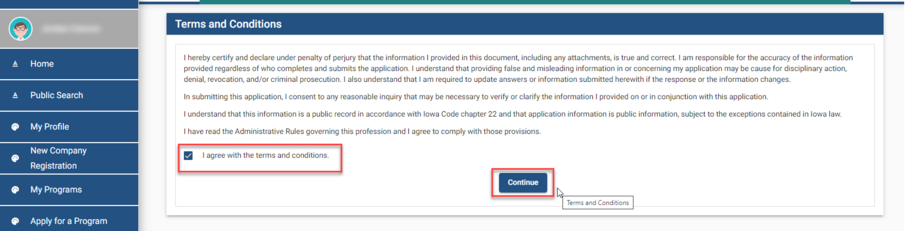
Terms and Conditions | DIAL & HHS Public Health
- Check the I agree with the terms and conditions box.
- Click Continue and then OK on the pop-up.
Contractor Renewal Multiple License Discount
This step applies to Contractor licensees who are eligible for a multiple-license discount. If you do not have multiple PMSB licenses, skip this step and go to the payment step.
After you reach the Make Payment screen, stop and do not submit your payment.
Follow these steps to start your individual license renewal:
- Click My Profile in the left menu. If you don't see this menu, use the hamburger menu (three lines) to open it.
- Check your profile icon in the left menu. It should not say Member.
- Choose Personal Licenses under Select a Membership for your Actions.
- Click Continue.
Looking for step-by-step instructions for your individual license? Visit the How do I Renew a PMSB Individual License page.
Make a Payment | DIAL & HHS Public Health
- You can pay for your application now with a credit card or bank account.
- You can also pay for your application by mailing a check or money order.
- Your application is only finished after you make a payment.
- Our staff does not get an alert for unpaid applications.
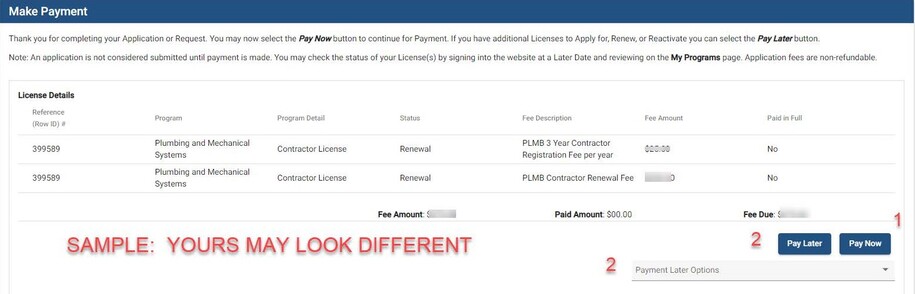
Option 1 - Pay Online
- Click Pay Now on the first payment screen.
- On the second payment screen, click Pay Now. You will be taken to the Make a Payment screen.
- Review the contact information. This section is filled in for you using info from your My Profile page.
- Scroll down and select your payment method.
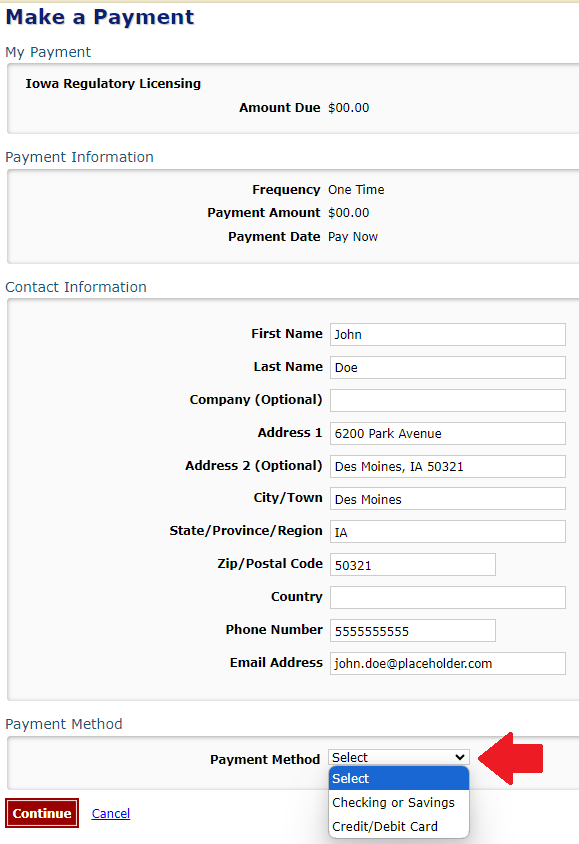
- Use the 'Payment Method' dropdown to select Checking or Savings or Credit/Debit Card.
- Enter your payment details.
- If you choose 'Checking or Savings,' please make sure your account number is right.
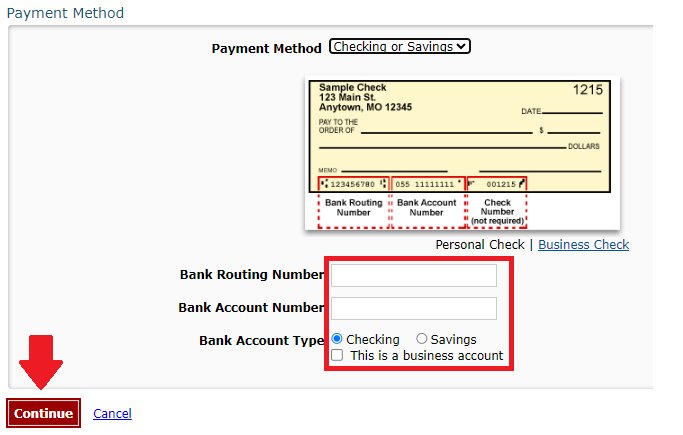
- Click Continue and then confirm the payment.
You will receive an email confirmation of your payment.
Option 2 - Pay Later
This option is used if you are mailing a check or money order.
- Use the Pay Later Options dropdown to select Check.
- You will be taken to the Programs page.
- Click on the Details button.
- Scroll down to the Payment section and click Print Bill.
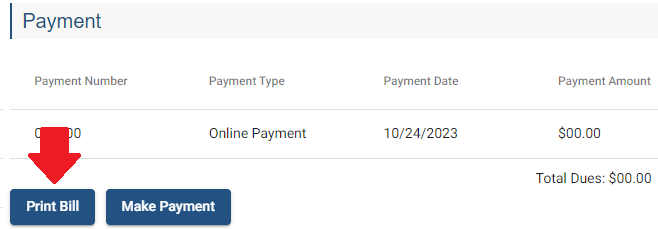
Your bill must be included with a mailed-in check or money order.
Mail your check or money order to the address on the printed bill.
Do not send cash in the mail.
What to Expect After You Submit Your Application
Applications are generally processed within 4–6 weeks. Applications requiring committee or board review need additional time for processing.
Once you submit your application or renewal, you will receive a confirmation email.
Program Staff Information Requests
PMSB staff may contact you if more information is needed. Please reply promptly to avoid delays.
Method of Contact
Please ensure your contact information is up to date.
PMSB staff sends requests from pmsb@dia.iowa.gov to the email addresses listed in your profiles:
- My Profile: Used for individual licenses.
- Update this email by changing it on your My Profile page. Click Continue to save this change.
- Company Profile: Used for contractor licenses.
- Update your Company Profile email by contacting the PMSB staff at pmsb@dia.iowa.gov. Provide the company name, the last four digits of the company profile's Tax ID/EIN/SSN, and your new email.
It is your responsibility to make sure the email on your profile or your company is up to date.
Audits
If audited, be prepared to submit your CEU certificates. Clear photographs of your certificates are accepted.
Your CEU certificates should have the following information:
- Course Name
- Course Number
- Course Date
- Hour Credits (Safety, Code, or Discipline)
Response Deadlines
You have 90 days to respond to a PMSB staff request for additional information. If we do not receive a response in 90 days, your application will become invalid. Any paid fees will be forfeited.
View Your Application Status
You can view the status of your PMSB application by following these steps:
- Sign in to the DIAL & HHS Public Health licensing system. Choose an option under Select a Membership for your Actions.
- Choose Personal Licenses to view your individual licenses.
- Choose your business profile's name to view your company's licenses.
- Click Continue. You will see a list of your current applications with the following columns:
- Program: PMSB licenses will say Plumbing and Mechanical Systems.
- Status: New or Renewal means the application hasn't been processed yet. View the Payment Details to confirm the application is complete. Unpaid applications aren't complete.
- Status: Ready to Issue means your application is processed. Your digital license will be emailed to you in the next few days.
- Issue Date: This is the date your most recent application was processed for that license.
- Expiry Date: This is your license's expiration date. When your application is approved, you will get a new Expiry Date.
- Details:
- A Details button will take you to your application Details page. You can pay outstanding fees and view your license documents on this page.
- An Edit button means the application was started, but it's incomplete. Click Edit to resume this application.
View Payment Details
Applications are only sent to PMSB staff for review after payment is made.
To verify your application is paid:
- Sign in to the DIAL & HHS Public Health licensing system. Choose an option under Select a Membership for your Actions.
- Choose Personal Licenses to view your individual licenses.
- Choose your business profile's name to view your company's licenses.
- Click Continue. You will see a list of your current applications.
- Click Details.
- Scroll down to the Fees section.
- Under the Payment column, check the Total Dues. If the Total Dues are $0.00, then no payment is due.
- Click the Make Payment button to pay an outstanding fee.
Do not submit a second payment if your bank shows that the Total Dues amount has already been paid. These issues typically resolve in a few business days.
If the issue does not resolve in a few business days, contact our PMSB team at pmsb@dia.iowa.gov. Provide your payment confirmation number (starts with IOWDI5).
View Your License Documents
PMSB licenses are digital and will not be mailed. Your digital license document is emailed within 1-2 days after it is processed.
You can view and print your license online by following these steps:
- Sign in to the DIAL & HHS Public Health licensing system. Choose an option under Select a Membership for your Actions.
- Choose Personal Licenses to view your individual licenses.
- Choose your business profile's name to view your company's licenses.
- Click Continue. You will see a list of your current applications.
- Click the Details button.
- Scroll down to the Attachments section.
- Your license documents are under the Attachments section. Click View to download your license.
Your 5 most recent licenses are displayed under Attachments. Use the Items per page dropdown to adjust how many license documents are shown.